
Before you start
Use the official Alipay app and follow the options shown for an overseas visitor. The exact labels and verification path can change by app version, account and market. Do not follow an old screenshot if the live app asks for something different.
- Keep your passport available for any identity check requested in the app.
- Use a phone number that can receive account or bank security messages abroad.
- Have more than one payment card if possible; issuer decisions differ.
- Arrange mobile data before landing so the wallet can load at checkout.
Set up Alipay for your trip
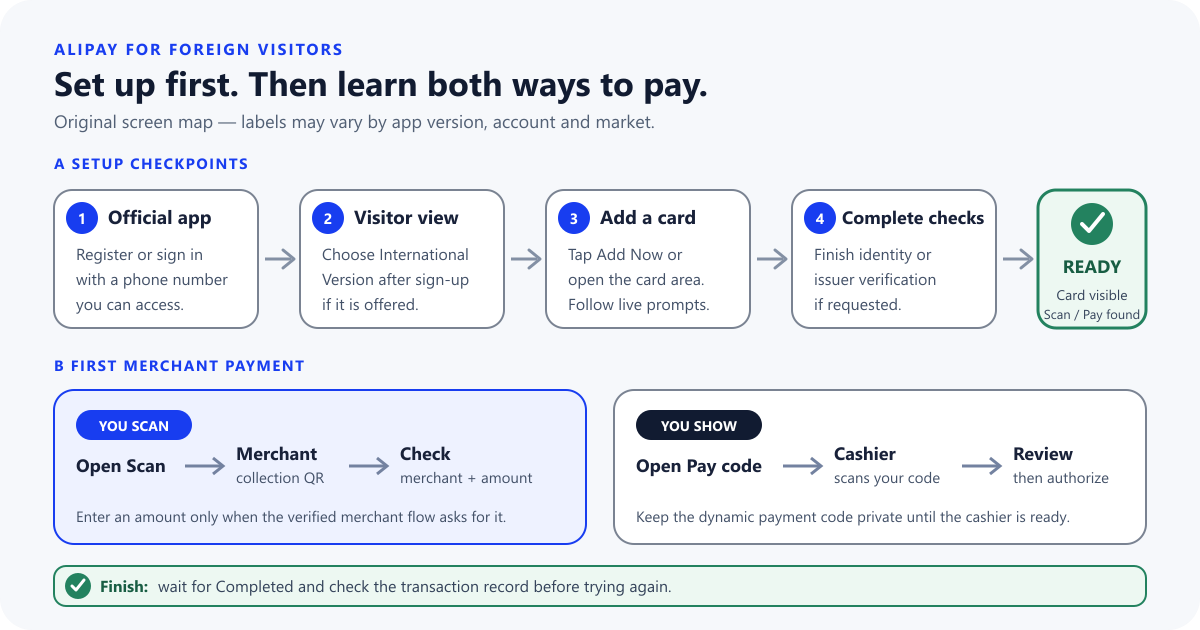
- Install Alipay from the official listing in your phone's app store and confirm the publisher.
- Create an account or sign in with contact details you can access while overseas.
- If an international or visitor interface is offered, choose the option that matches your account.
- Open the card area and add an eligible international debit or credit card.
- Complete the identity, card and issuer checks shown in the live app.
- Find the Scan and Pay or payment-code controls before you need them at a busy counter.
You are ready to try a purchase when
- The linked card appears in Alipay and can be selected as a funding source.
- You can open both Scan and the Pay or payment-code screen without help.
- Your phone can receive any account or issuing-bank security message.
The app accepting a card does not guarantee that every later transaction will succeed. The merchant category, account status, payment amount, network and issuing bank can all affect a purchase. Read the current confirmation screen before approving it.
Use Alipay for a merchant purchase
If the merchant asks you to scan, open Scan inside Alipay and scan the merchant's collection code. Enter an amount only when the verified merchant flow asks for it, then check the merchant name, amount and selected funding card before authorizing.
If the merchant asks to scan you, open the Pay or payment-code screen and show the dynamic code only when the cashier is ready. Review any confirmation shown before authorizing.
If a restaurant QR opens a menu or mini program, complete the order flow it shows; that QR is not necessarily the final payment code. Use the dedicated guide when you need to identify the correct action at the counter.
After either route, wait for a completed result and check the transaction record. If the status is pending or unclear, ask the merchant to confirm receipt before attempting the same payment again.
Merchant payment is not the same as wallet balance or transfer
An international card added to Alipay is intended for eligible merchant purchases. It does not automatically make every wallet feature available. Personal transfers, red packets, balance top-ups and other financial services follow different rules.
Alipay and Alipay+ are also not the same product. Alipay is the wallet app covered by this setup guide. Alipay+ is a cross-border acceptance network that can connect Alipay and supported partner wallets with merchants. Travelers using a home-country wallet should check the current Alipay+ partner list instead of following Alipay app steps.
Fix common Alipay failures
The card will not link
Check that the details match the card and that your bank permits overseas digital-wallet use. Complete any identity check shown, then contact the issuer or try a different eligible card rather than repeating the same attempt.
The app asks for different verification
Use your passport details exactly as printed and follow the current overseas-user route in the app. If the request does not fit your account, stop and use official Alipay support; do not send identity documents to an unofficial helper.
The QR opens the wrong screen
A menu, login, contact or personal-transfer code is not the same as a merchant collection code. Ask the cashier which checkout flow they expect.
The payment is declined
Check mobile data, the selected card and any message from Alipay or your bank. Read any current fee or limit notice on screen. If the result remains unclear, do not approve the same purchase twice—check transaction history and ask the merchant to confirm receipt.
Keep a backup outside Alipay
Prepare Weixin Pay if it is practical for your account, and carry a physical bank card plus RMB cash. Keep your home SIM or other security-message route available. A second payment method is most useful when it is on a different account, card or device dependency.
Alipay for foreigners: common questions
Do I need a Chinese bank account?
Official visitor guidance says eligible overseas users can add eligible international cards. Availability still depends on the current Alipay flow, your account and your issuing bank.
Can I set up Alipay before flying?
You can install the app, create the account, add a card and complete requested checks before departure. A successful setup does not prove that every merchant transaction will work, so keep a backup.
Can my international card fund a personal transfer?
Do not assume so. Merchant purchases and person-to-person transfers are different payment routes; follow the live app's eligibility message.
Where can I check current cards, fees and limits?
Use the live Alipay app, its official visitor guidance and your card issuer. Those details change too often to treat an old travel screenshot as permanent.